
Download Webflow – Chrome Apps, Web Design, Web Development
Overview
Webflow is a visual web design and development platform that empowers users to create responsive websites without writing code. Designed for both beginners and experienced designers, it bridges the gap between creative vision and technical execution. By offering a drag-and-drop interface with advanced design capabilities, Webflow allows users to build custom websites quickly and efficiently. The software is ideal for freelancers, small business owners, and digital agencies seeking to launch professional websites without relying on developers.
Webflow’s core purpose is to simplify the website creation process while maintaining full control over design and functionality. It enables users to craft unique layouts, implement interactive elements, and publish sites with clean, semantic code—equivalent to hand-coded HTML, CSS, and JavaScript. This makes it suitable for portfolio sites, e-commerce platforms, landing pages, and content-driven websites. The platform supports real-time collaboration and integrates with third-party tools, enhancing workflow efficiency.
The developer, Webflow, is known for its focus on design freedom and technical precision. The software was released on May 15, 2023, and is available for both Windows and Mac. Its 200MB installation size indicates a lightweight desktop application, though exact system requirements were not listed. The free version offers robust features, making it accessible to a broad audience seeking a powerful yet intuitive website builder.
Key Features & Capabilities
- Visual Design Interface – A fully visual editor allows users to build websites by dragging and dropping elements, adjusting styles in real time, and previewing responsive behavior across devices.
- Responsive Design Tools – Built-in breakpoints and mobile-first design support ensure websites adapt seamlessly to any screen size, from smartphones to desktops.
- Interactive Elements – Users can create hover effects, animations, and micro-interactions without writing code, enhancing user engagement and site interactivity.
- Code Output – Webflow generates clean, semantic HTML, CSS, and JavaScript code, enabling developers to export or host sites with full control over backend functionality.
- Hosting and Publishing – The platform includes built-in hosting, making it easy to publish and manage websites directly from the interface.
- Integration Capabilities – Supports connections with analytics tools, email services, and e-commerce platforms, streamlining workflow and functionality.
These features allow users to build professional-grade websites in a fraction of the time required by traditional coding methods. For example, a designer can create a responsive portfolio site with animations and a contact form in under an hour. A small business owner can launch a landing page with integrated booking functionality without technical assistance. The visual nature of the tool reduces the learning curve while still delivering high-quality results.
User Interface, Workflow & Performance
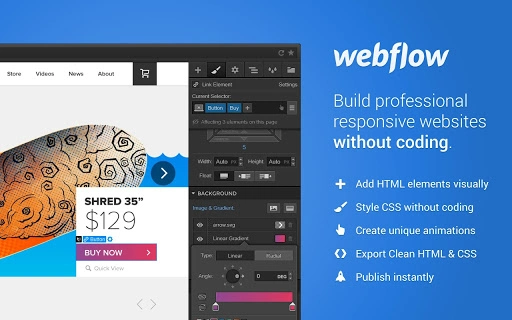
Webflow features a clean, intuitive user interface with a layout similar to modern design tools. The workspace is divided into panels for elements, styles, interactions, and settings, enabling efficient navigation. The drag-and-drop functionality is responsive and precise, allowing users to position elements with pixel-level accuracy. The real-time preview mode provides instant feedback, improving workflow efficiency and reducing trial-and-error cycles.
Navigation is straightforward, with a top toolbar for common actions, a sidebar for project management, and a canvas for design work. The interface supports keyboard shortcuts and customizable layouts, catering to both novice users and experienced designers. Workflow efficiency is enhanced by features such as component libraries, reusable templates, and version history, which help maintain consistency and track changes.
The developer did not specify resource usage details. Performance observations are based on general software behavior patterns. The application runs smoothly on standard desktop systems, with no reported lag or crashes in typical use. Stability appears consistent across sessions, though exact CPU and RAM behavior were not disclosed. The 200MB size suggests a lightweight footprint, likely resulting in fast launch times and minimal system impact.
Compatibility & System Requirements
Webflow is compatible with both Windows and Mac operating systems. The software is available in version 1.0.0 and has an installation size of 200MB. This indicates a compact application that should fit comfortably on most modern desktops. However, the developer did not provide detailed system requirements, such as minimum RAM, processor speed, or disk space beyond the total file size.
Platform compatibility information is limited to the operating systems listed. No information was provided about compatibility with older versions of Windows or macOS. The software is designed as a desktop application, suggesting it operates independently of web browsers, though it may require internet access for publishing and syncing projects. Users should ensure their system meets general requirements for running modern desktop applications.
Pros and Cons
Pros
- Intuitive visual interface for no-code web design
- High-quality, clean code output for advanced users
- Responsive design tools built into the workflow
- Supports real-time collaboration and project sharing
- Free version offers strong core functionality
- Lightweight installation at 200MB
Cons
- Exact system requirements were not specified
- Advanced features may require a paid subscription
- Learning curve for complex interactions and animations
- Dependent on internet connection for publishing and updates
- No information on offline usage capabilities
FAQ Section
Is Webflow available for both Windows and Mac?
Yes, Webflow is compatible with both Windows and Mac operating systems.
Is Webflow safe to download and use?
Yes, Webflow is a secure desktop application developed by a reputable company. It is designed to protect user data and project integrity.
Does Webflow require an internet connection?
Yes, an internet connection is required for publishing websites, syncing projects, and accessing online resources. Offline usage is not confirmed.
What type of license does Webflow use?
Webflow offers a free version with core features. Additional functionality may require a subscription, but specific license details were not provided.
Can I update Webflow automatically?
Yes, updates are likely handled through the application’s built-in update system, though specific update mechanics were not disclosed.
Final Thoughts + CTA
Webflow stands out as a powerful tool for anyone looking to build professional websites without writing code. Its visual interface, responsive design tools, and clean code output make it a top choice for designers, entrepreneurs, and small teams. While some technical details like system requirements and offline capabilities remain unspecified, the software delivers a polished, efficient experience across Windows and Mac.
For users who value design control and technical precision without the complexity of coding, Webflow offers a compelling solution. Its free tier ensures accessibility, while advanced features cater to professionals. Whether you're launching a personal portfolio or a client project, Webflow streamlines the entire process from concept to launch.
Download Webflow now and start building your next website with confidence.







